Know who did what training, when — and when it's due again.
Replace the training spreadsheet with a live compliance dashboard, a color-coded training matrix, and audit-ready records — for your entire workforce.
TrainGrid by Solvesoft is training management and compliance-tracking software for manufacturing plants and other regulated workplaces, made in Milton, Ontario. It tracks who was trained, when, and when it is due again, and produces the audit-ready records that SQF, BRCGS, HACCP, GMP, ISO 9001 and ISO 45001 programs ask for.
Purpose-built for the standards you're audited against
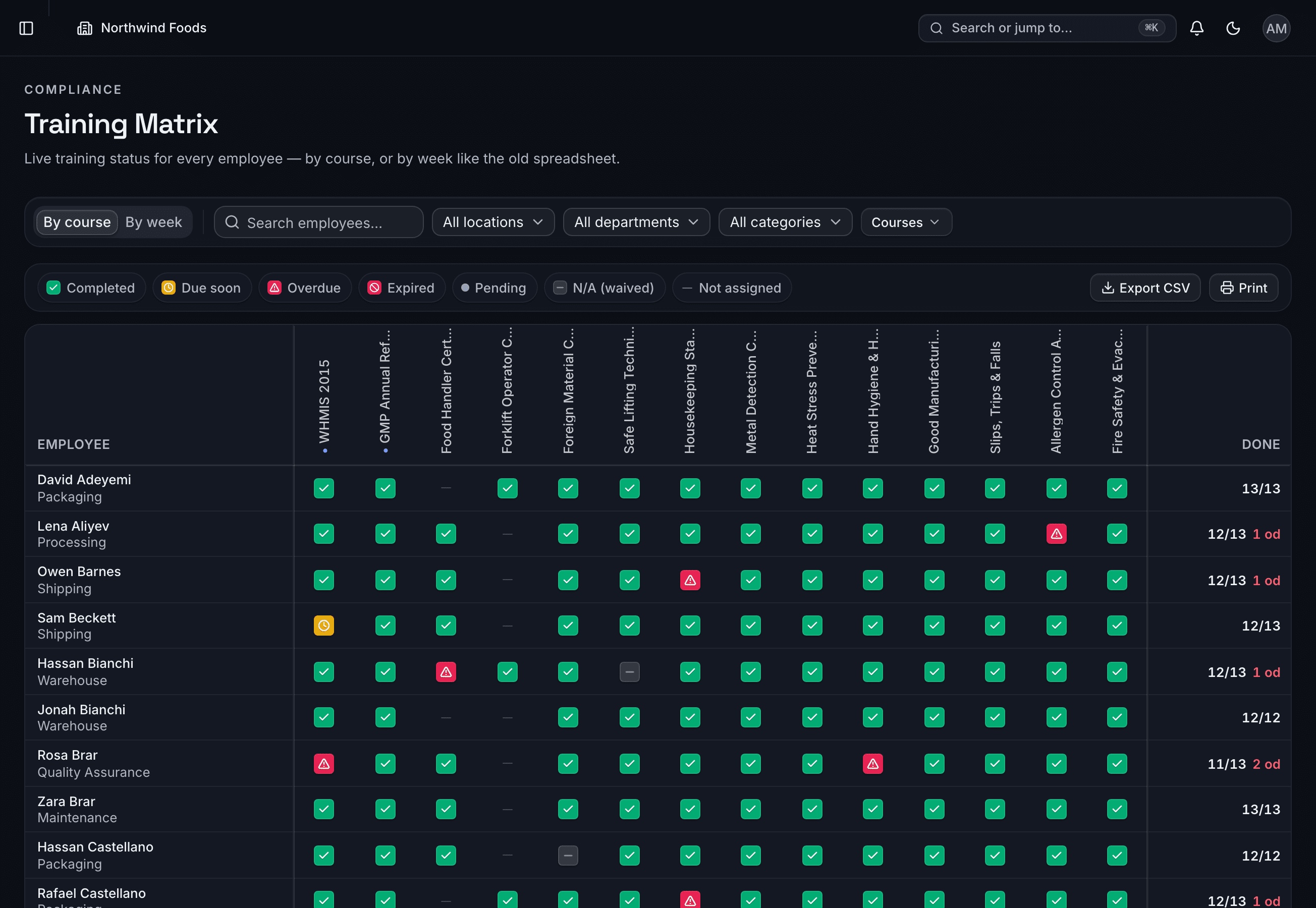
Your spreadsheet, alive.
Every employee × every course, color-coded and always current. Filter by site, department or week. Click a red cell, mark it complete, watch it turn green.
Explore the matrix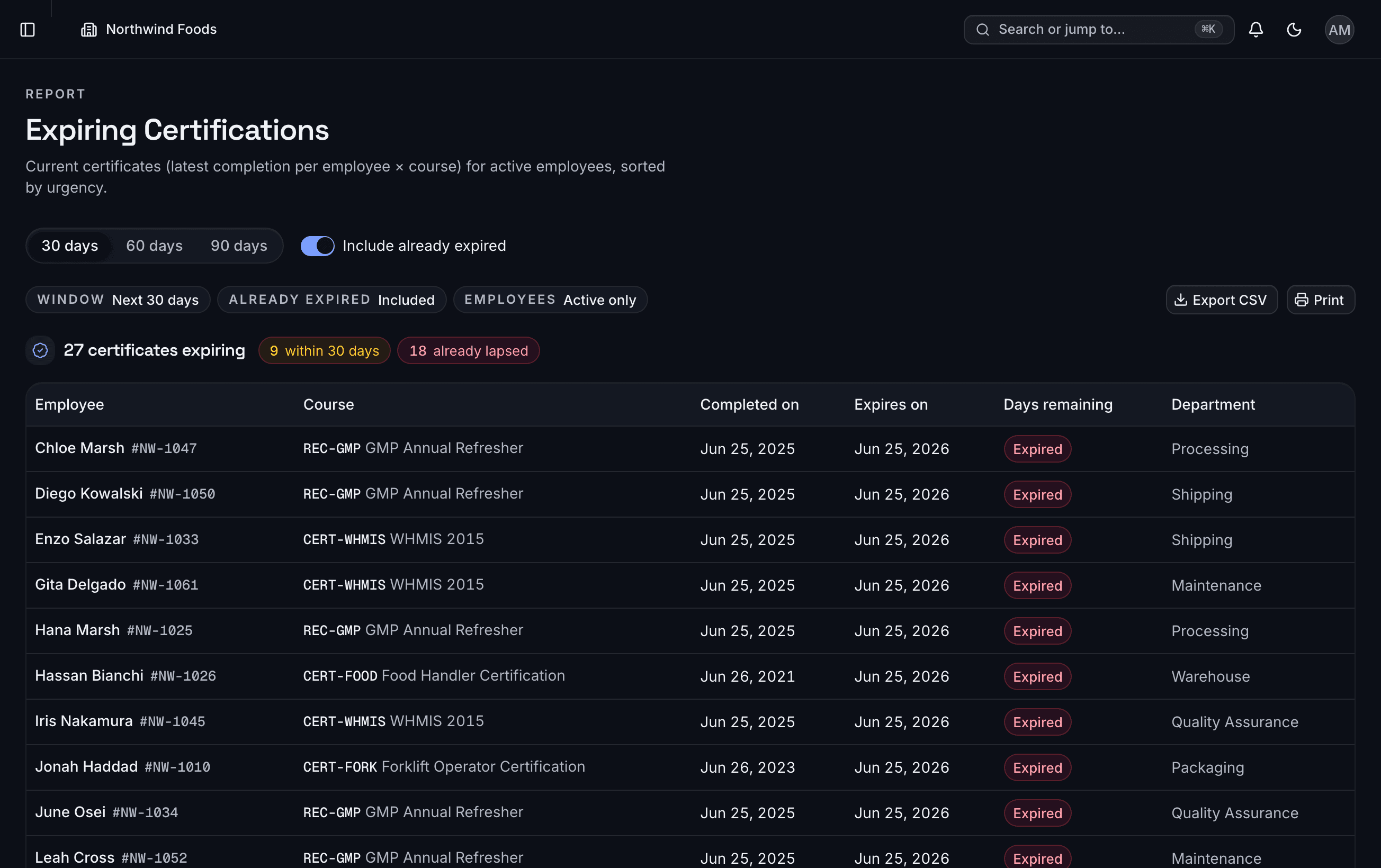
Every record, one search away.
Transcripts, expiring certifications and missing-mandatory gaps — printable with your logo, ready for the inspector before they finish the sentence.
See the reports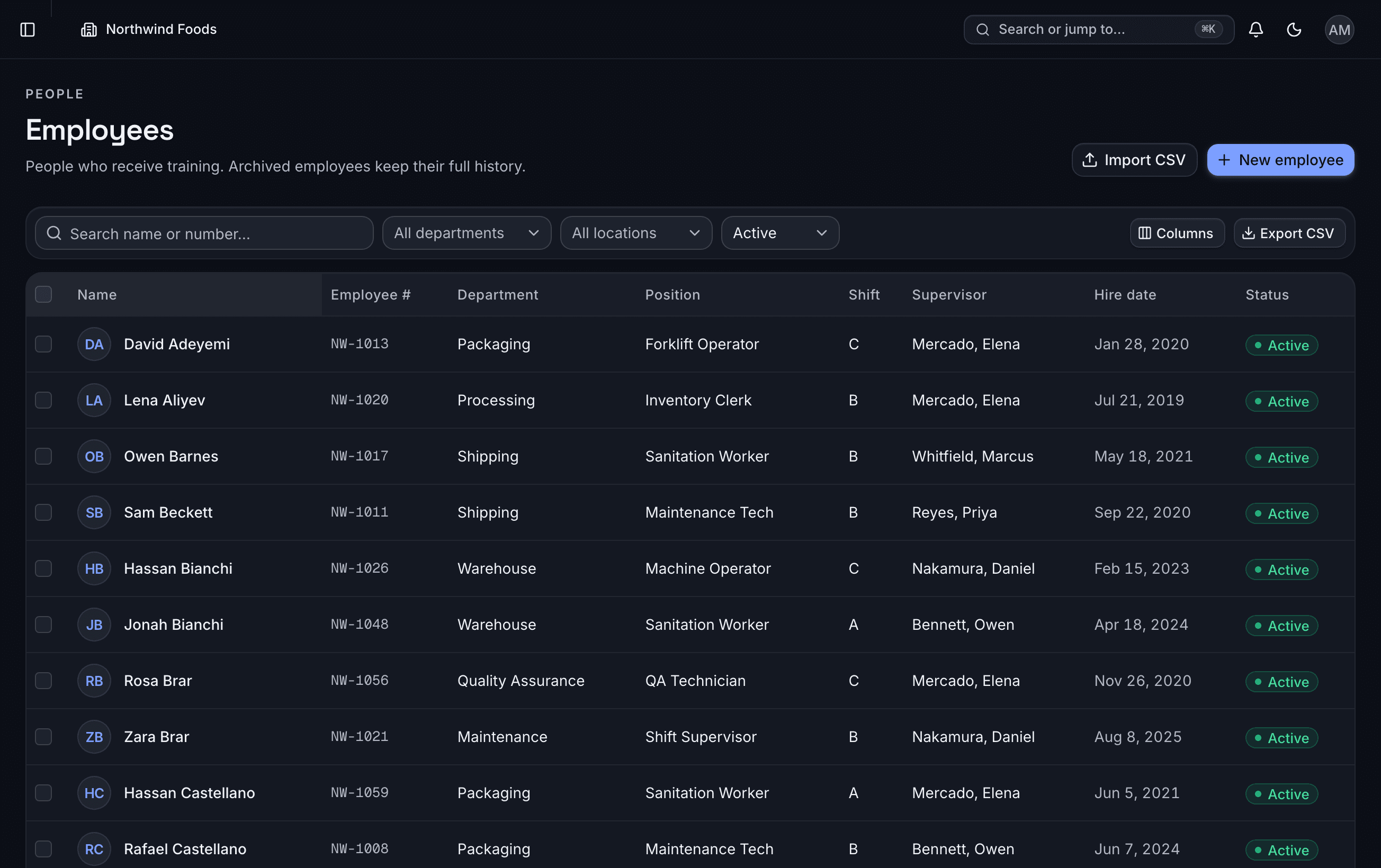
Straight from your HR export.
Drag in your employee CSV — headers auto-map, Excel dates and all. Archive leavers and restore rehires with their whole history intact.
Import your peopleSix screens carry most of the day-to-day work.
Real screens from TrainGrid, with sample data from a fictional plant.
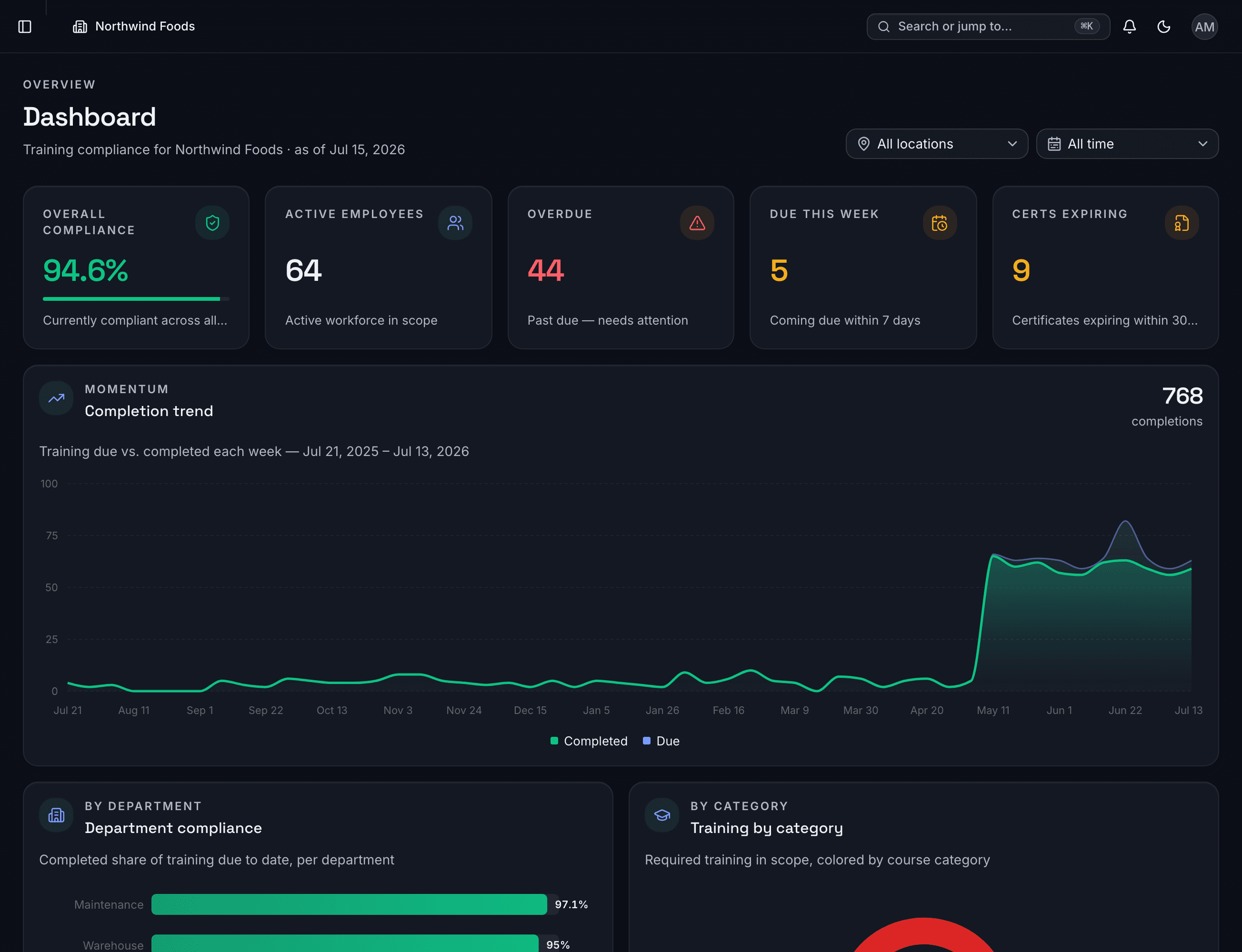
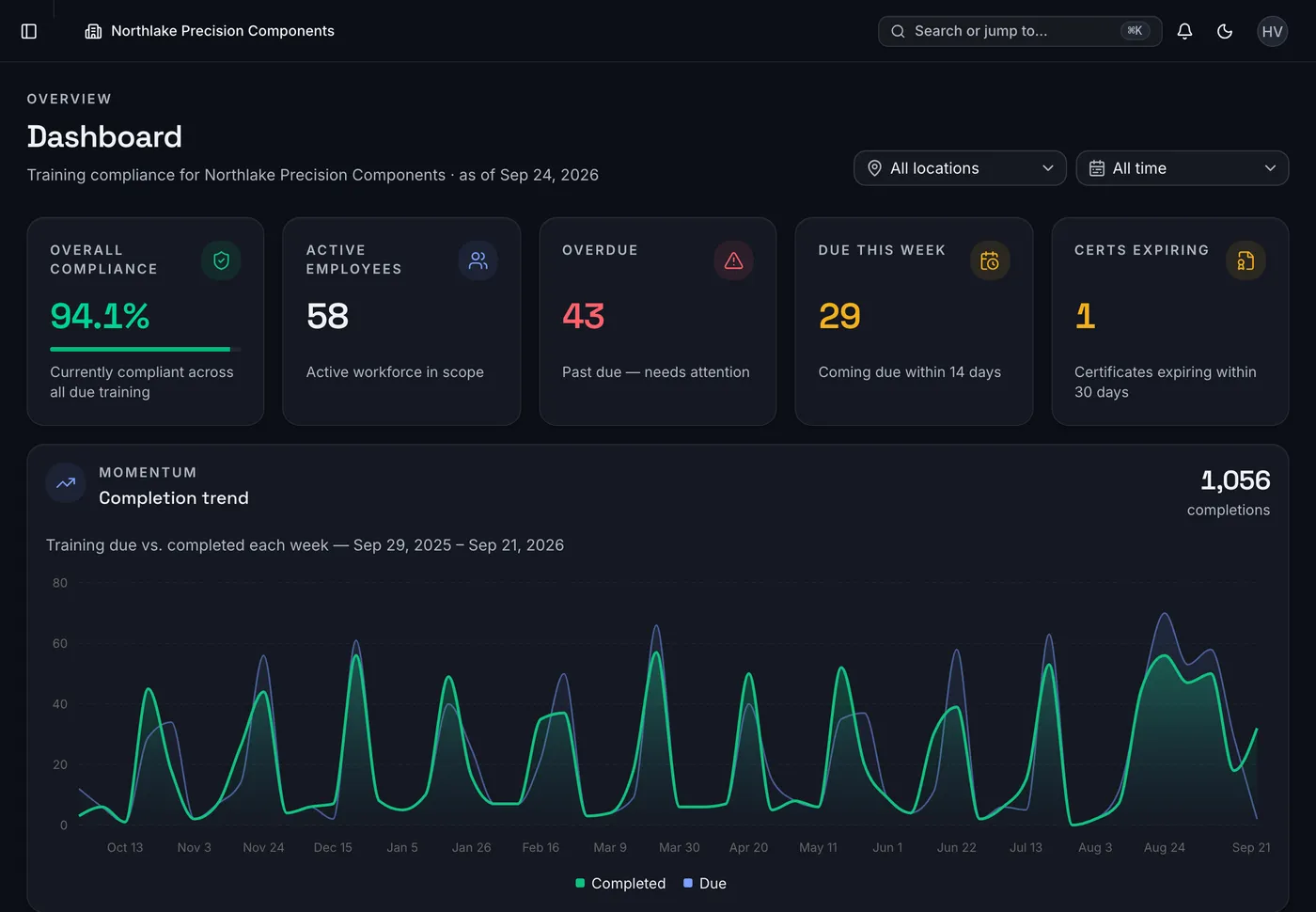
Where you stand, the moment you sign in.
Overall compliance, overdue training, what is coming due and certificates about to expire, with the weekly trend of training due against training completed. Filter by location or period.
Five numbers at sign-in
Overall compliance, active employees, overdue, what is coming due and certificates expiring within 30 days.
The weekly trend
Training due against training completed each week, so a slipping month shows before the audit does.
 Five numbers at sign-inOverall compliance, active employees, overdue, what is coming due and certificates expiring within 30 days.The weekly trendTraining due against training completed each week, so a slipping month shows before the audit does.
Swipe the screenshot sideways, then tap a number.Hover or select a number to see what it points to.Tap a number to see what it points to.
Tap a number on the screenshot to see what it points to.
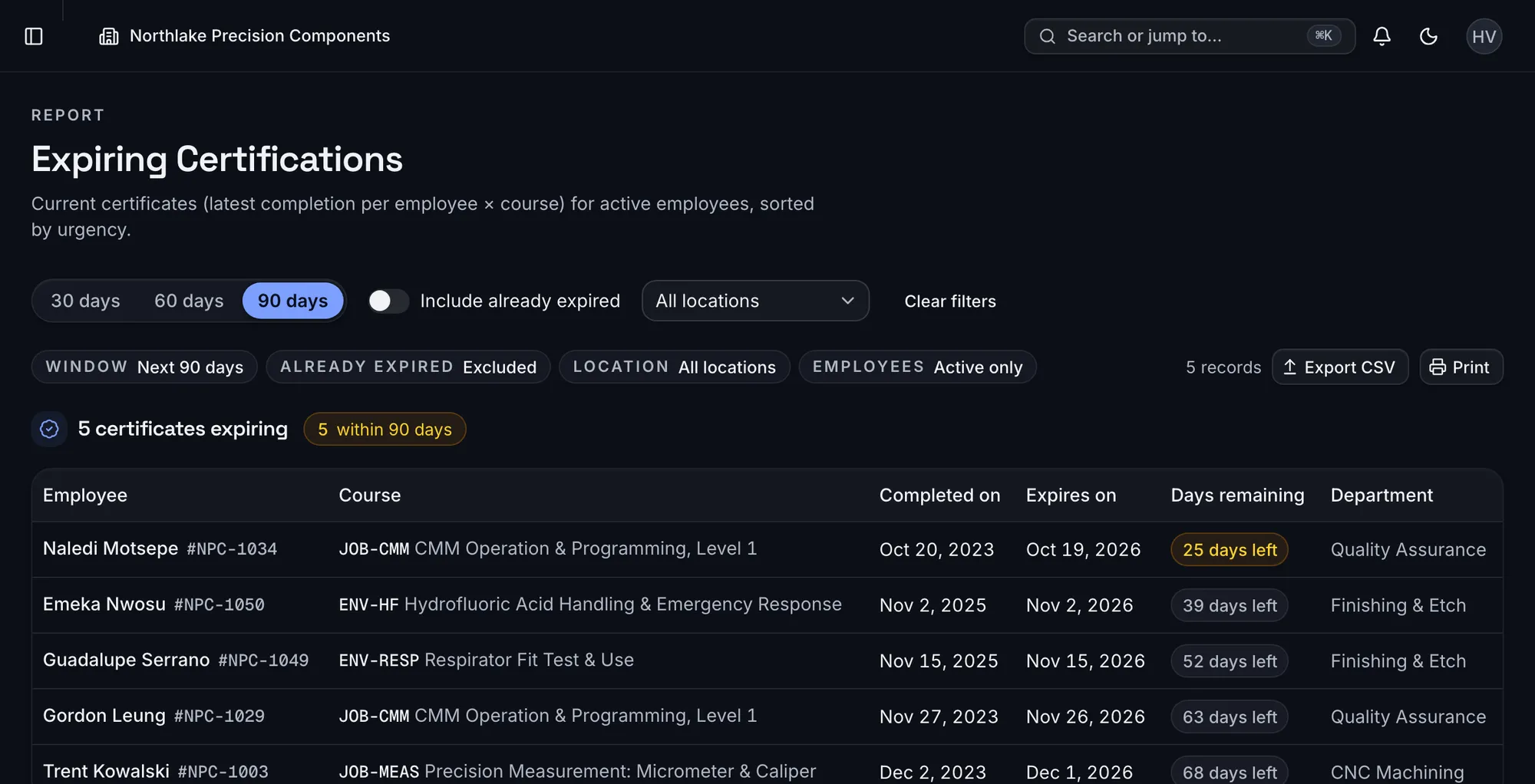
See every certificate before it lapses, with the refresher already assigned.
Set how long a course stays valid. TrainGrid works out the expiry date, assigns the next round when training is completed, and sends supervisors a daily digest of what is due soon, overdue or expiring.
Pick the window
30, 60 or 90 days, with or without certificates that have already lapsed.
Sorted by urgency
Days remaining on every certificate, soonest first.
 Pick the window30, 60 or 90 days, with or without certificates that have already lapsed.Sorted by urgencyDays remaining on every certificate, soonest first.
Swipe the screenshot sideways, then tap a number.Hover or select a number to see what it points to.Tap a number to see what it points to.
Tap a number on the screenshot to see what it points to.
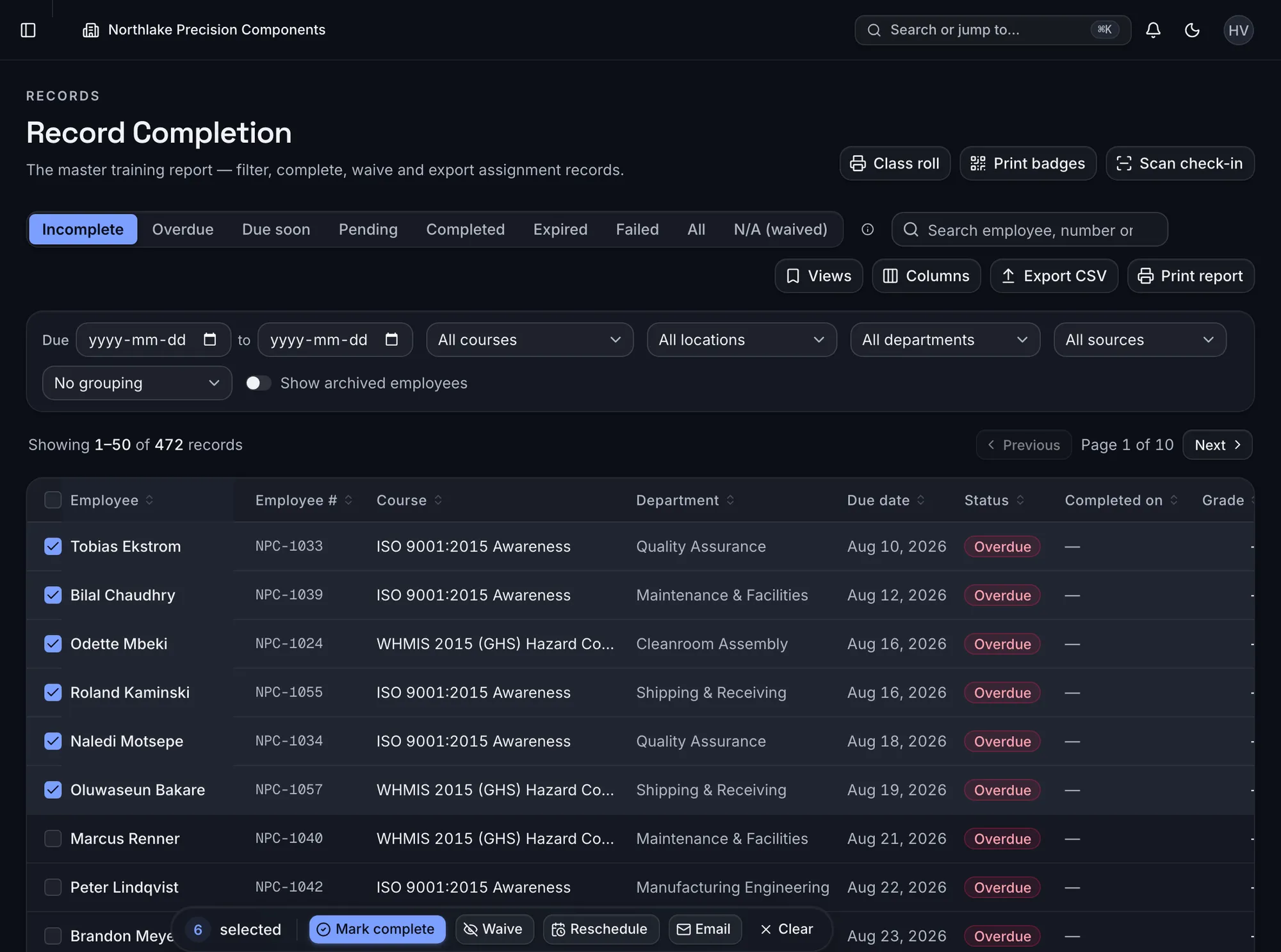
Run the session on paper. Record it once.
Print a sign-in sheet, hold the toolbox talk, then mark the whole class complete in one action with the signed sheet attached.
Select the class
Select everyone who attended. The action bar counts them.
One action
The Mark complete button records the whole class, with the signed sheet attached once.
 Select the classSelect everyone who attended. The action bar counts them.One actionThe Mark complete button records the whole class, with the signed sheet attached once.
Swipe the screenshot sideways, then tap a number.Hover or select a number to see what it points to.Tap a number to see what it points to.
Tap a number on the screenshot to see what it points to.
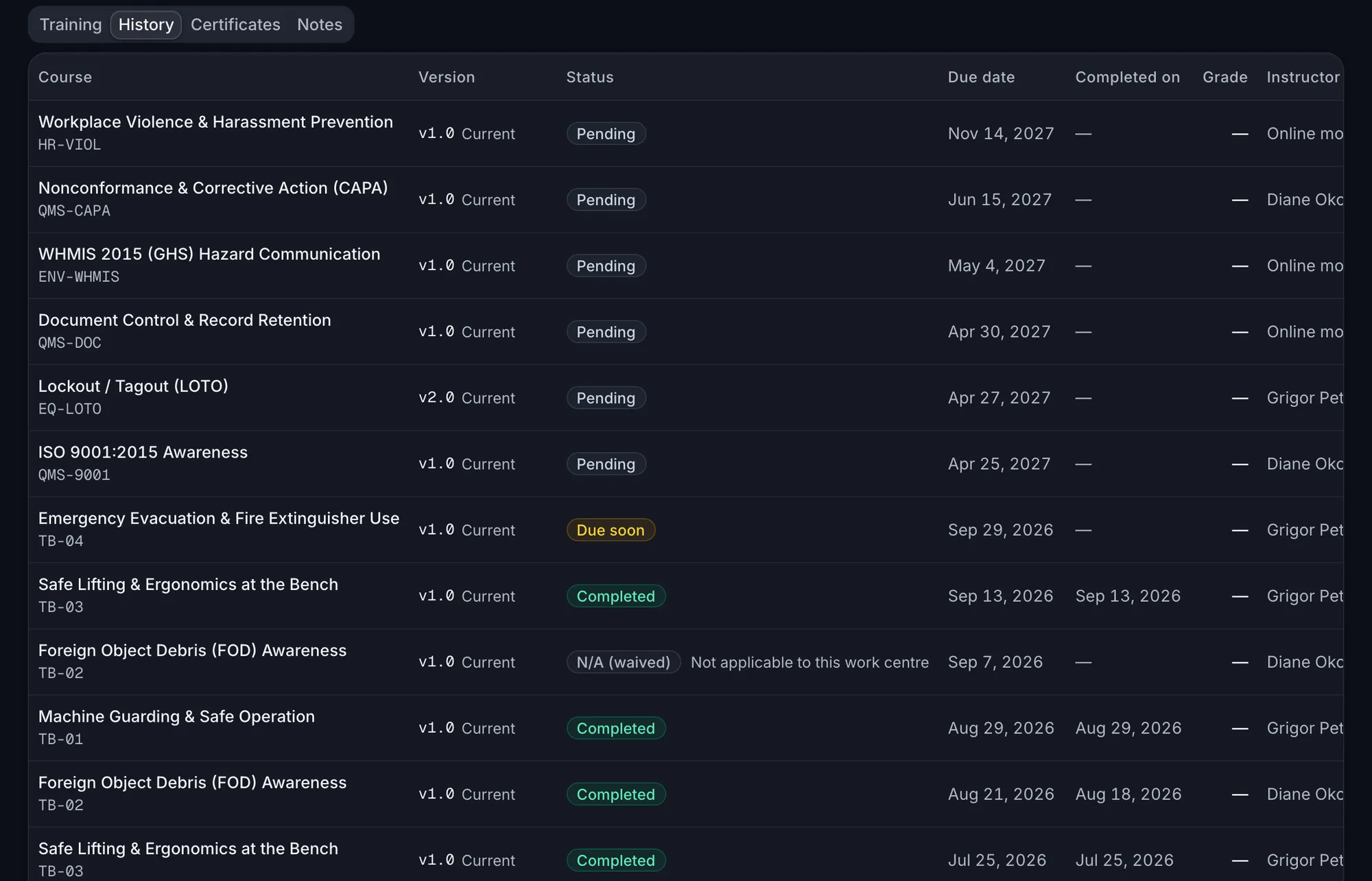
Every record, one search away.
Find any employee from anywhere in the app and open their full history: every course, version, date, grade and instructor. Revise a course and every past record keeps the version it was earned under.
The version it was earned under
Every completion keeps the course version that was current at the time.
Date, grade and instructor
When it was completed, the grade and who taught it, on every record.
 The version it was earned underEvery completion keeps the course version that was current at the time.Date, grade and instructorWhen it was completed, the grade and who taught it, on every record.
Swipe the screenshot sideways, then tap a number.Hover or select a number to see what it points to.Tap a number to see what it points to.
Tap a number on the screenshot to see what it points to.
Trained is not the same as qualified.
Record practical assessments, schedule reassessments, and see who is qualified to do the work, by requirement and location. The matrix can switch to the same competency and qualification view.
Who is not qualified yet
The report counts the people who still need an assessment before they can do the work.
Six outcomes, not a yes or no
Competent, competent with conditions, needs improvement, not competent, not assessed or exempt.
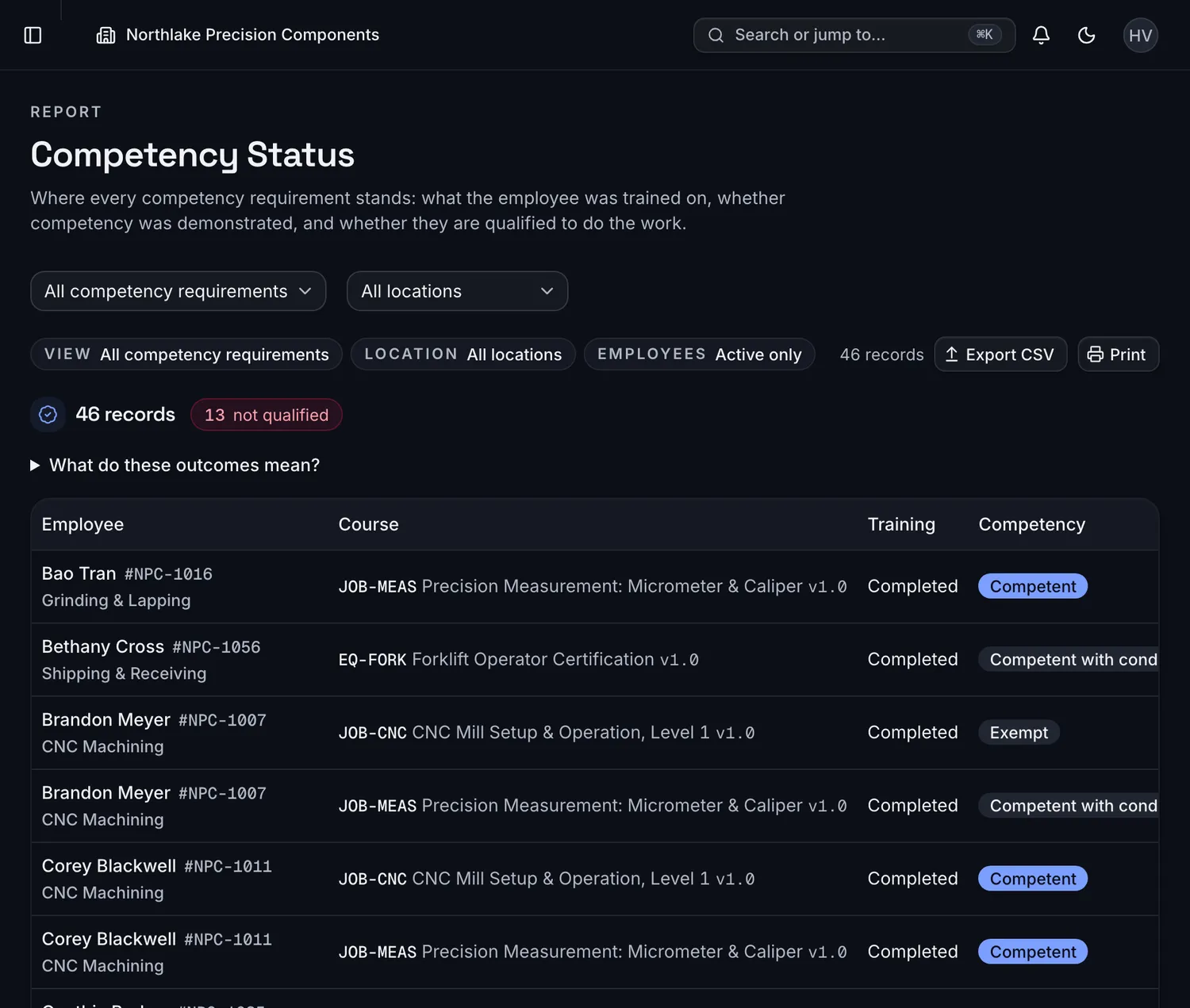 Who is not qualified yetThe report counts the people who still need an assessment before they can do the work.Six outcomes, not a yes or noCompetent, competent with conditions, needs improvement, not competent, not assessed or exempt.
Swipe the screenshot sideways, then tap a number.Hover or select a number to see what it points to.Tap a number to see what it points to.
Tap a number on the screenshot to see what it points to.
Training hours, per person and per period.
Hours entered once per session land on every attendee's record and roll up for any date range, with CSV export.
Totals for any period
Total hours, the average per employee, and internal, external and online hours for the dates you pick.
Hours per person
Each employee's hours for the period. Open a row to see the records behind the number.
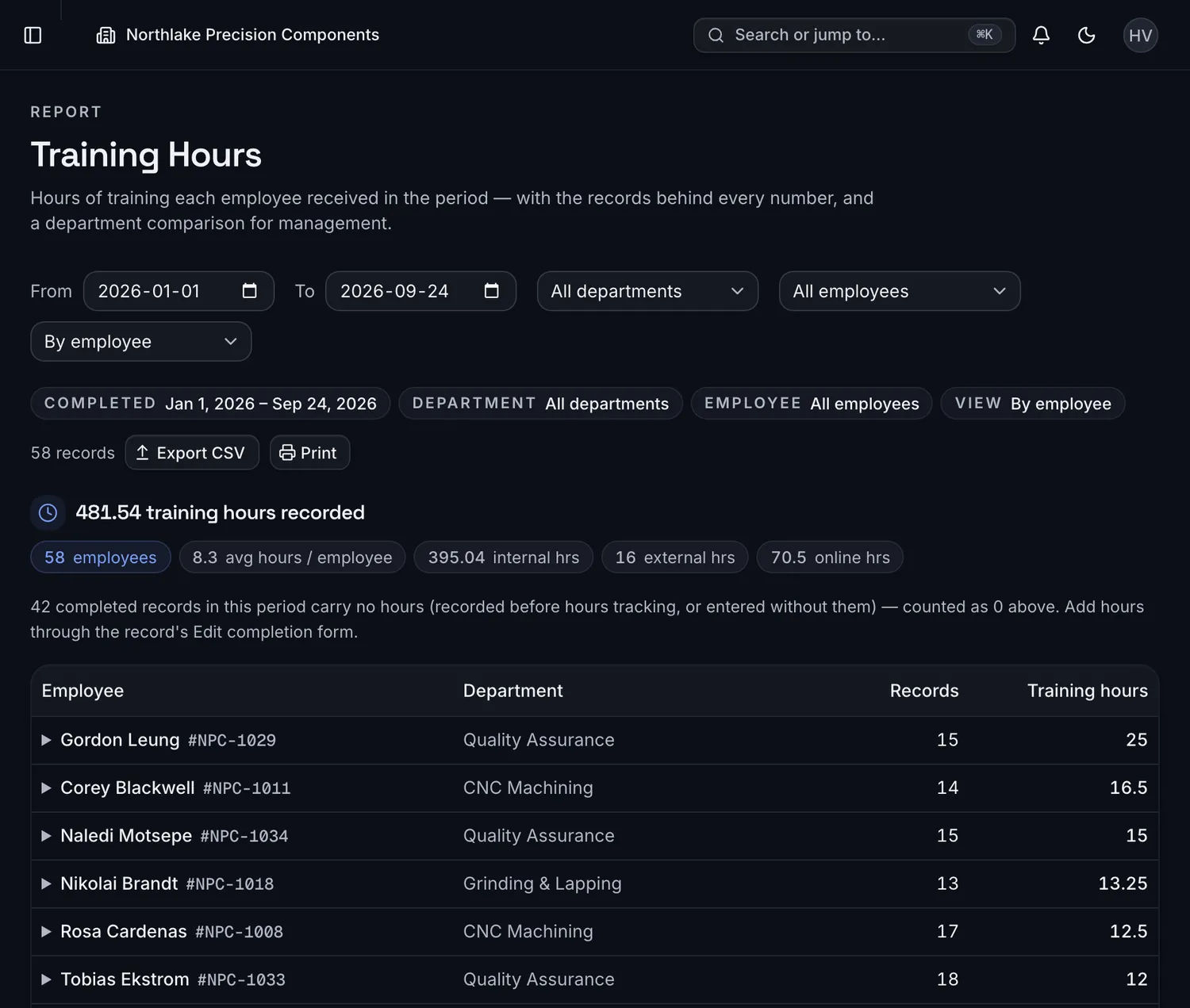 Totals for any periodTotal hours, the average per employee, and internal, external and online hours for the dates you pick.Hours per personEach employee's hours for the period. Open a row to see the records behind the number.
Swipe the screenshot sideways, then tap a number.Hover or select a number to see what it points to.Tap a number to see what it points to.
Tap a number on the screenshot to see what it points to.
compliance, visible the moment you sign in — not the week you rebuild the spreadsheet.
Live in an afternoon.
No consultants, no six-week rollout. Import, train, and walk into your next audit prepared.
Import your people
Upload your HR export or add employees by hand. Departments, positions and supervisors map automatically.
Run your training
Print the sign-in sheet, hold the toolbox talk, then mark everyone complete in a single action. Recurring courses reschedule themselves.
Ready for every audit
Walk in with a live dashboard and any record one search away. Certificates renew automatically; nothing slips.
Everything the spreadsheet can't do.
Live training matrix
Color-coded, filterable, always current — by course or by week.
Compliance dashboard
KPIs, trends and department breakdowns the second you log in.
Bulk completion
Mark 150 people complete in one action, sign-in sheet attached once.
Self-renewing certificates
Expiry calculated automatically; the next assignment spawns on completion.
Reminders that chase for you
Due-soon, overdue and expiring-cert digests to the right supervisors.
Roles & multi-site
Location-scoped supervisors, org-wide reporting, full audit log. Multiple locations on Enterprise.
Competency & qualifications
Trained isn't the same as qualified. Practical assessments, reassessment reminders, and role-readiness at a glance.
Course versions & change control
Revise a course, choose who retrains — every historical record keeps the version it was earned under.
Training hours tracking
Hours captured once per session, on every record — annual totals per employee with drill-down and exports.
Different plants. The same audit questions.
Standard-agnostic: the same training record answers ISO, OSHA, GMP and food-safety auditors.
Discrete manufacturing
Machine, LOTO and SOP sign-off records by department and shift.
Pharma, nutraceutical and cannabis
GMP training records with the version each one was earned under.
Warehousing and distribution
Forklift and equipment certifications with the refresher assigned before they lapse.
Food and beverage
SQF, BRCGS and HACCP training records in one matrix.
Public agencies
Annual in-service hours by employee, with the records behind every number.
Aerospace and defense suppliers
Operator qualifications and recurring training, kept ready for AS9100 audits.
Also built for automotive parts, medical devices, chemicals and coatings, plastics and packaging, metals and fabrication, electronics assembly, mining and aggregates, and utilities and water.
The spreadsheet got you here. It won't get you through the audit.
| Capability | Spreadsheet | Generic LMS | TrainGrid |
|---|---|---|---|
| Live compliance dashboard | No | No | Yes |
| Color-coded training matrix | No | No | Yes |
| Bulk-complete a whole class | No | sometimes | Yes |
| Certificates that renew themselves | No | sometimes | Yes |
| Competency assessments & role readiness | No | add-on | Yes |
| Course versioning with retraining control | No | sometimes | Yes |
| Training hours per employee, per period | manual | sometimes | Yes |
| Audit-ready transcripts & prints | manual | Yes | Yes |
| Multi-site, role-scoped reporting | No | add-on | Yes |
| Database-level tenant isolation | — | No | Yes |
Simple pricing. Unlimited employees.
One flat price per plan, never per employee — every tier tracks your whole workforce. Every plan includes a 14-day free trial.
Starter
A single site off the spreadsheet
$1,188 save $198/yr · billed annually
- 1 location
- 3 staff logins
- Unlimited employees
- Matrix, dashboard & all reports
- Sign-in sheets, certificates & audit log
- Email reminders & supervisor digests
- CSV import & export
- 5 GB attachment storage
No credit card required
Skip the trial and subscribe →Professional
Plants that live in their program
$2,988 save $498/yr · billed annually
- 1 location
- 10 staff logins
- Everything in Starter
- 25 GB attachment storage
No credit card required
Skip the trial and subscribe →Enterprise
Multi-site & audit-heavy industries
$5,388 save $898/yr · billed annually
- Multiple locations & divisions
- Unlimited staff logins
- Everything in Professional
- Location-scoped roles & reporting
- Unlimited attachment storage
No credit card required
Skip the trial and subscribe →Prices are in US dollars and exclude sales tax, which is calculated at checkout based on your billing address.
Questions, answered.
Where does our data live, and is it secure?
On enterprise-grade cloud infrastructure, encrypted in transit and at rest. Every organization's data is isolated at the database level with row-level security — not just in application code — and every change is captured in an append-only audit log.
Are we locked in? Can we get our data out?
Never locked in. You can export everything as CSV any time, and the schema is standard Postgres. Pilot agreements include a written data-export guarantee.
Does it work with our existing systems?
CSV import matches your HR export out of the box (Excel dates included), and a BambooHR roster sync is built in. Microsoft Entra ID sign-in is built in: invited users sign in with their work Microsoft account. It is sign-in only; accounts are still created and removed by invitation inside TrainGrid, and nothing is synchronized from your directory.
How hard is it to roll out?
Import your employees in minutes and train a supervisor in about half an hour. It is deliberately simple, and the user guide walks through the first import step by step.
Does TrainGrid handle competency assessments and training hours?
Yes — both. Completing a course and being qualified are tracked separately: practical competency assessments with six recordable outcomes, reassessment reminders, and a per-position role-readiness view. Training hours are captured once per session, land on every attendee's record, and roll up into per-employee totals for any period, with drill-down and exports. Course revisions are versioned too — records always show the version they were earned under.
How are we billed?
One flat price per plan — never per employee. Each tier includes a set number of staff logins (the people who administer training) and tracks your entire workforce at no extra cost. Every plan starts with a 14-day free trial, no credit card required.
Is TrainGrid the same as trainingGrid?
No. TrainGrid (traingrid.app) is training management and compliance-tracking software for manufacturing plants and other regulated workplaces, built by Solvesoft in Milton, Ontario, Canada. It is not affiliated with trainingGrid, a separately owned learning management product with a similar name.
Replace the training spreadsheet this week.
Import your employees, add your trainings, and walk into your next audit with every record one search away.